How to Fix “This CNIC Already Exists” Error in Apni Chat Mehfooz Chat 2026
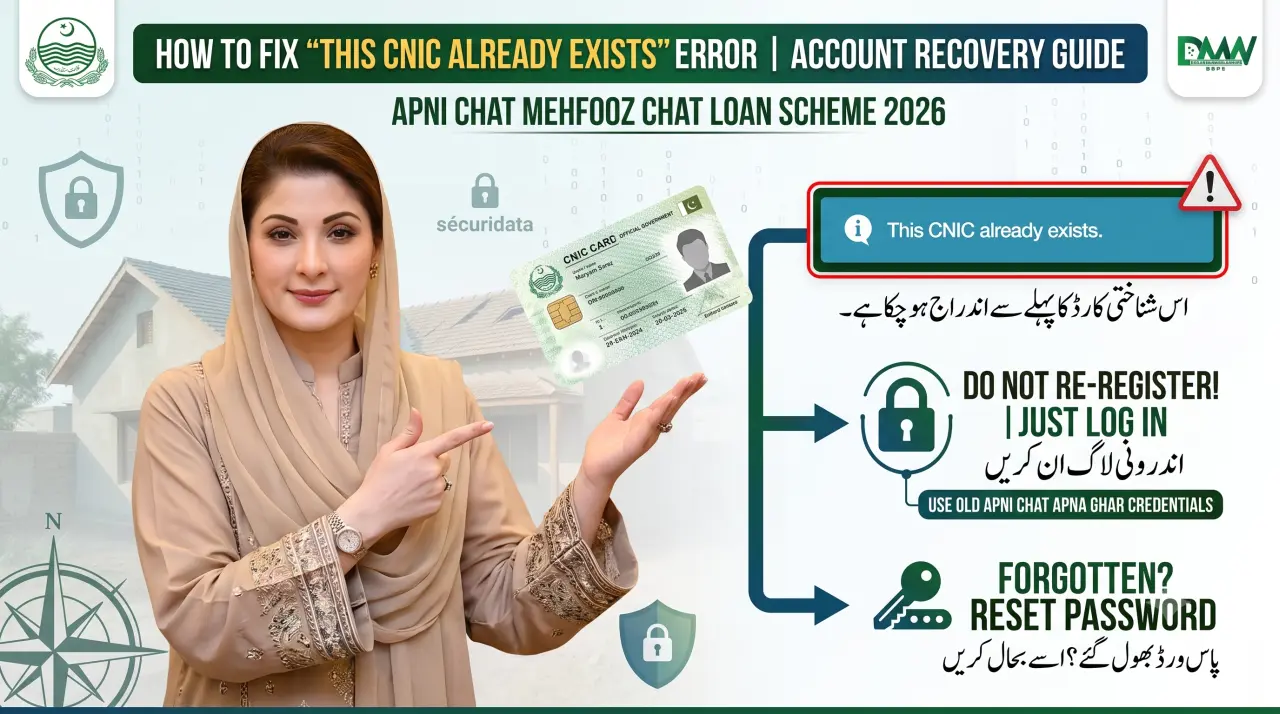
Are you trying to register for the new government loan program but getting stuck? Many citizens are facing a common problem on the online portal. When they type their Computerized National Identity Card number, a message pops up. The screen displays an error stating, “This CNIC already exists.”
This can be confusing and frustrating for honest applicants. You might wonder if someone else used your identity or if the system is broken. Do not worry at all. This is a very common issue with a simple solution.
Chief Minister Maryam Nawaz Sharif launched the Apni Chat Mehfooz Chat Loan Scheme 2026 to help poor citizens. This program provides zero-interest money to repair weak roofs or build an extra room. In this guide, you will learn exactly why this CNIC error happens. We will explain how the new portal connects to older housing programs. Most importantly, we will show you exactly how to fix this issue so you can apply for your loan today.

Important Highlights
| Feature | Detail |
| Scheme Name | Apni Chat Mehfooz Chat Loan Scheme 2026 |
| Common Error | This CNIC already exists |
| Reason for Error | Old account exists on the Apna Ghar portal |
| Solution | Log in with old details instead of registering |
| Official Website | acag.punjab.gov.pk |
| Official Helpline | 0800-09100 |
What is the Apni Chat Mehfooz Chat Scheme?
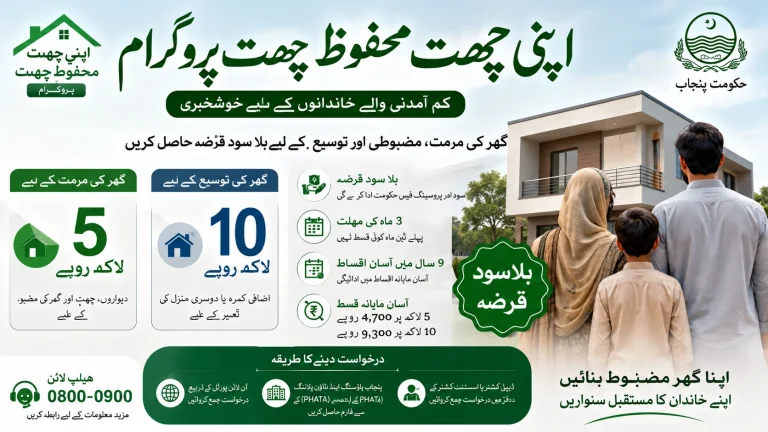
The Apni Chat Mehfooz Chat program is a brilliant public welfare project. The Government of Punjab created it to help low-income families improve their current homes. Previous government programs focused on giving people new houses or plots. This new initiative focuses on making existing homes stronger and bigger.
Many old houses in Punjab have weak roofs that become dangerous during the rainy season. To stop tragedies from happening, the government offers an interest-free loan of up to 500,000 rupees. Families can use this money to repair their dilapidated roofs.
For families who need more living space, the program offers a bigger loan. You can get up to 1,000,000 rupees to build an additional room or a second floor. The government even reduced the monthly installments. Instead of paying 14,000 rupees, citizens will now pay between 4,700 and 9,300 rupees every month.
Why Are You Seeing “This CNIC Already Exists”?
When you visit the official website to apply, you must fill out the Citizen Registration Form. You enter your full name, father’s name, mobile network, and CNIC number. But when you click the submit button, the portal blocks you. A message appears on the screen saying the CNIC is already registered.
This happens because the system only allows one account per person. The database checks your 13-digit identity number against thousands of records. If it finds a match, it stops the registration to prevent duplicate accounts. This is a security feature to stop fraud and ensure fairness.
But what if you never applied for the Mehfooz Chat scheme before? Why is your identity card already in the system? The answer lies in the history of the portal itself.
The Connection Between Apna Ghar and Mehfooz Chat
The Apni Chat Mehfooz Chat program is not a completely standalone project. It is actually a direct extension of an older initiative. The parent project is the famous Apni Chat Apna Ghar scheme. Both of these programs share the exact same digital platform.
When the government launched the new Mehfooz Chat extension, they did not create a new database. They used the same website, which is acag.punjab.gov.pk. If you registered for the Apna Ghar scheme in the past, your data is still saved there.
Because your old account is still active, the website remembers you. When old users try to register a completely new account, the computer gets confused. It sees that your CNIC is already inside the Apna Ghar database. That is exactly why it gives you the “already exists” warning.
How to Fix the CNIC Registration Error
Fixing this problem is very simple. You do not need to create a new email address or buy a new SIM card. You just need to change how you enter the website. Follow these easy steps to access your account.
Step 1: Use the Login Option
The biggest mistake people make is clicking the “Register” button. Since your account already exists, you must skip the registration page. Go to the main homepage of acag.punjab.gov.pk. Look for the login or sign-in area instead.
Click the login button and type your 13-digit CNIC number. Then, type the exact same password you used when you applied for the old Apna Ghar scheme. Once you enter these old details, the portal will open immediately. Inside your dashboard, you will find the new application forms for the Mehfooz Chat loan.
Step 2: Recover Your Password
Many people applied for the old scheme months ago and simply forgot their passwords. If you try to log in and the password is wrong, do not panic. Every government portal has a recovery option.
Look directly under the login boxes for a link that helps you recover a forgotten password. Click on this link. The system will ask for your CNIC number and your registered mobile phone number. The government will then send a secret code to your phone via SMS. Type this code into the website to create a brand new password.
Step 3: Contact the Official Helpline
Sometimes, technical glitches happen. You might not receive the SMS code, or you might have changed your mobile number. In rare cases, you might realize you never registered for the old scheme at all. This means someone else might have used your identity card illegally.
If you face any of these difficult situations, you need human help. Pick up your phone and dial the official government helpline at 0800-09100. The support staff will ask you a few security questions to verify your identity. Once verified, they will manually reset your account or fix the database error for you.
Loan Categories for Registered Users
Once you successfully log into your old account, you can apply for the new loans. Make sure you select the correct category that matches your construction needs.
If your house needs urgent repairs, choose Category 01. The government will give you 500,000 rupees to fix your roof. You will have three full years to return this money. The funds will come to your bank account in two separate installments.
If you want to build a new floor, choose Category 02. The portal will allow you to request up to 1,000,000 rupees. Because the amount is bigger, the government gives you six years to pay it back. They will give you the first part of the money after approval. The second part comes when your construction reaches the lintel level.
If you are a lucky citizen who received land under the Apni Zameen Apna Ghar program, you get special treatment. The system will allow you to apply for a massive 1,500,000 rupees to build your dream home from scratch.
Frequently Asked Questions
What does the error “This CNIC already exists” mean?
This error means your identity card number is already saved inside the government’s digital database. The system will not let you create a second account.
Why is my CNIC in the database if I never applied for Mehfooz Chat?
The Mehfooz Chat scheme is an extension of the older Apni Chat Apna Ghar program. If you registered for the old program, your data is already stored on the same portal.
How can I fix the CNIC error on the portal?
You must stop trying to register a new account. Go to the login page and use your old Apna Ghar password to access the system.
What should I do if I forgot my old password?
You can click the forgot password button on the login screen. The system will send a secure verification code to your registered mobile number to help you create a new password.
Is the portal for Mehfooz Chat different from Apna Ghar?
No, both housing schemes use the exact same official website, which is acag.punjab.gov.pk. This is why their databases are connected.
What if someone else used my CNIC to create a fake account?
If you suspect someone stole your identity to register, you should immediately call the official toll-free helpline at 0800-09100 to report the fraud.
How much loan can I get for roof repairs after logging in?
Once you fix your login issue, you can apply for an interest-free loan of up to 500,000 rupees to repair a dangerous or weak roof.
Can I change my registered mobile network on the portal?
If you ported your number to a different network, you must specify the correct new network like Zong or Jazz when recovering your account to receive the SMS.
Conclusion
The “This CNIC already exists” error is a very minor hurdle. It simply proves that the Punjab Information Technology Board keeps your data safe and prevents duplicate entries. Since the Apni Chat Mehfooz Chat Loan Scheme 2026 is an extension of the Apni Chat Apna Ghar project, old users already have an account.
Instead of getting frustrated, simply use the login button. Enter your previous credentials or use the password recovery feature to get back inside. Once logged in, you can easily access the interest-free loans to repair your roof or build a new room. Always remember to use the official website at acag.punjab.gov.pk and call the official helpline at 0800-09100 if you need extra support. Protect your personal information and take full advantage of this wonderful government initiative.